
Feature Overview
On January 7th 2026, Iron Solutions released two enhancements that help our clients simplify the valuation of Precision Upgrade Kits (PUKs) on agriculture equipment.
(1) New IronGuides feature to support PUK valuation
Within the IronGuides web-based solution, we’ve added a new data feature to the “Start Appraisal” tool that provides users with a standardized way to document PUK valuation data. It provides users with five new drop-down menus and text fields that capture key data and improve valuation accuracy and consistency. If needed, users can add multiple PUK’s to a single piece of equipment.
(2) A new IronGuides API update that supports standardized PUK data
IronGuides has enhanced its API to capture, store, and distribute Precision Upgrade Kit (PUK) data in a standardized format. This update allows PUKs to be entered, validated, valued, and selected more consistently across products, reducing manual effort and improving appraisal accuracy.
These two improvements ensure Precision Upgrade Kits can be entered, validated, valued, and selected consistently, reducing manual work and improving appraisal accuracy.
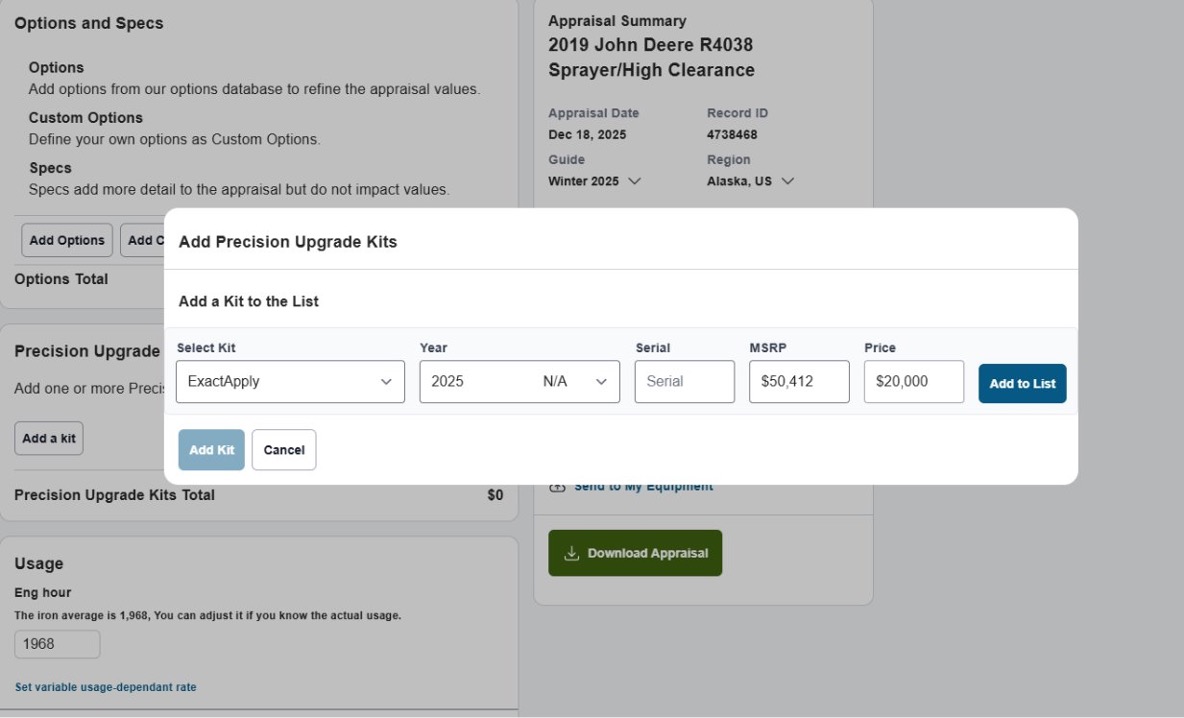
Before this enhancement, dealers and IronGuides users faced challenges evaluating Precision Upgrade Kits. While PUK data and pricing could be manually entered, users were required to define PUK descriptions themselves. Because of this, PUK descriptions were not standardized, creating inconsistencies in valuations and duplicative manual work.
Common dealer challenges included:
-
- Inability to consistently evaluate PUKs within valuation workflows, even though PUK upgrades significantly impact machine value
-
- No standardized method for entering PUK pricing, model years, or descriptions
-
- Limited UI support for selecting multiple PUKs (e.g., See & Spray + ExactApply) during an appraisal
These new enhancements provide dealers with a unified, quality-controlled approach to managing Precision Upgrade Kits within IronGuides.
Benefits of the New PUK Enhancements
Unified Upgrade Evaluation
Dealers can now evaluate PUKs consistently within IronGuides using standardized data and workflows.
Improved Data Accuracy
Standardized PUK option descriptions and model years reduce discrepancies and improve valuation confidence.
More Accurate Appraisals
Allowing users to add multiple PUKs to an appraisal improves valuation precision for machines with complex upgrade configurations.
FAQ
Will all IronGuides users benefit from the new PUK valuation feature?
Yes. These updates apply to all IronGuides users who work with options, pricing, and valuation data.
Does this new PUK valuation feature cost anything extra?
No. This feature has been added at no additional charge.
How do I access the PUK valuation feature?
You can locate this new feature within the “Start Appraisal” tool in IronGuides. Note – this feature only appears when you are creating an appraisal for John Deere equipment that has the capability to have a precision upgrade kit.
Which equipment brands will users be able to add PUK’s to during a valuation?
John Deere only.
Are the MSRP and Price data fields populated by IronGuides, or does the user need to input that manually?
The IronGuides system will populate the MSRP field once the user selects the PUK and model year. Users can manually input their own price into the “Price” field.
Does the MSRP or the number entered in the “Price” field show up in the IronGuide appraisal?
The appraisal will display the price that the user manually enters in the “price” field.
Where does IronSolutions get the MSRP data for PUK’s?
It is obtained from John Deere.
Do I need to have a serial number to use the PUK valuation feature?
No. This data field is optional.
What IronGuides user interface (UI) changes are included?
IronGuides will now have the following fields available in the appraisal tool:
- Drop down menus:
- “Select Kit” – Select PUKs from a prepopulated list using standardized option descriptions
- “Model Year” – Choose the model year
- Populated Text Fields:
- “MSRP” – the MSRP will populate once the user chooses a PUK kit and model year.
- Open Text Fields:
- “Serial” – User enters serial number
- “Price” User enters their own dealer valuation for the PUK.
- Additional Options:
- “Add to list” button – Adds the PUK that the user has entered information for into the current appraisal
- “Add Kit” button – Add and additional precision upgrade kit to the same appraisal (e.g., See & Spray + ExactApply)
Can IronGuides users add more than one PUK to a piece of equipment during an appraisal?
Yes. Users can add multiple PUK’s to each piece of equipment during an appraisal.
Why are PUKs important to dealers?
Precision Upgrade Kits significantly impact equipment resale value. Consistent evaluation ensures accurate pricing and reduces the risk of undervaluing machines with costly upgrades.
Can PUK valuation data be exported?
Export functionality is available within the appraisal PDF download.
Request a demo
Visit the Contact Us page on Ironsolutions.com to contact sales and request a demo
Visit IronGuides.com to explore the full valuation platform.